
Measure area and distance
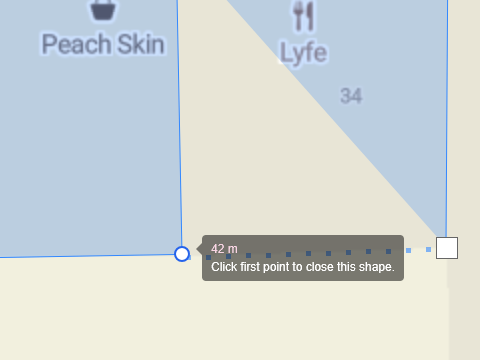
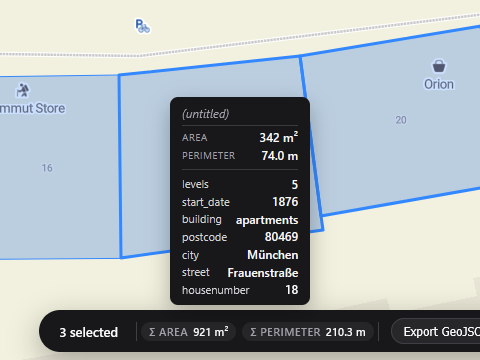
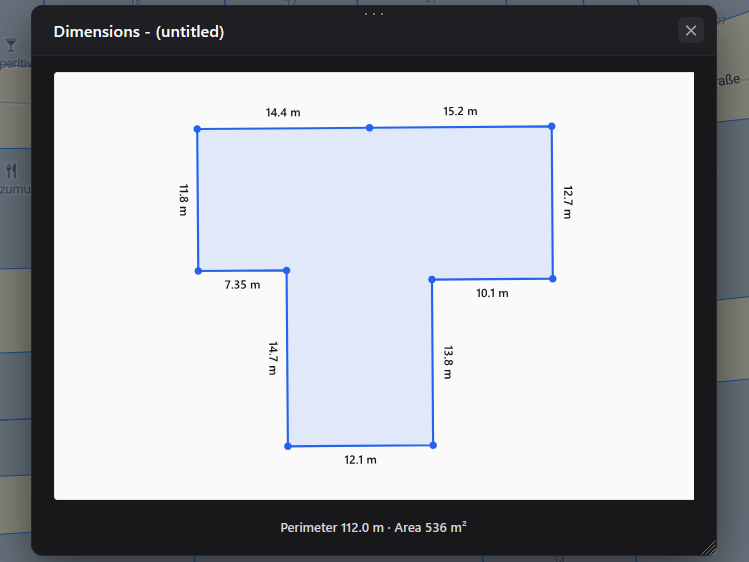
Draw a polygon to read its area, or a line to read its length, directly on an interactive map. Geisro updates the measurement as you draw and can label every side with its dimension. Based on your subscription and entirely in your browser.
Geodesic accuracy · auto units m to km, m² to ha to km² · per-side dimensions
How to measure on a map
- Open the map editorSign in for free with your Google or Microsoft account.
- To measure areaDraw a polygon around the region - the enclosed area is shown as you draw.
- To measure distanceDraw a line - the total length and segment lengths update live.
- Open the dimensions viewSee each side labelled with its length.
- SaveStore the measured geometry in a layer in your project.
Distance and area are computed geodesically, on the real Earth, so the numbers stay honest at any scale. Select several shapes and Geisro totals them.
Frequently asked questions
Can I measure both area and distance?
Yes - polygons report their area and lines report their length, with per-side dimensions available in the dimensions view.
Do I need to install anything?
No. Everything runs in your browser. Open the map editor and start measuring.
Can I save and edit the polygon later?
Yes. Polygons are saved to your project in colour-coded layers, and stay editable - drag vertices, recolour or add attributes any time.
Is it free?
Drawing and saving shapes is free. Live area and length measurements and the per-side dimensions view are on the paid Pro, Ultra and Team plans - see pricing.
Open a map and start measuring
N 52.5163 E 13.3777 · GEISRO ONLINE MAP EDITOR