
Draw a polygon on a map
Outline any area - a field, a property boundary, a delivery zone or a construction site - by clicking points on an interactive map. Geisro measures the area as you go and saves it to your project. Free and entirely in your browser.
Free to start · sign in with Google or Microsoft · no install
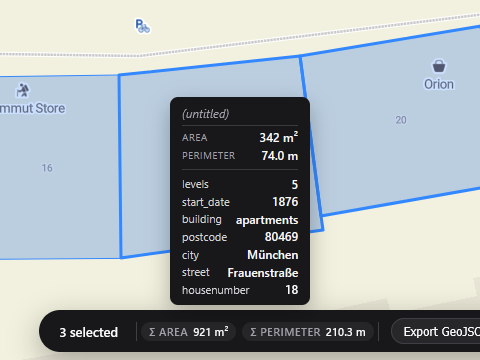
How to draw a polygon on a map
- Open the map editorSign in for free with your Google or Microsoft account.
- Select the polygon toolPick it from the toolbar on the map.
- Click to place each vertexAdd points along the side of the area you want to outline.
- Close the shapeClick the first point again, or press Finish, to close the area.
- Read the area and saveAdjust vertices by dragging them, then save the polygon to a layer.
Need to fine-tune later? Every polygon stays editable - drag its vertices, change its layer colour, add custom attributes, or delete the last point while you draw.
Frequently asked questions
Can I see the area of the polygon I draw?
Yes - Geisro displays the enclosed area as you draw and in the geometry's details, so you can size a plot or zone precisely.
Can I save and edit the polygon later?
Yes. Polygons are saved to your project in colour-coded layers, and stay editable - drag vertices, recolour or add attributes any time.
Is it free?
Yes, drawing polygons is free. Sign in with Google or Microsoft and start straight away.
Open a map and start drawing
N 52.5163 E 13.3777 · GEISRO ONLINE MAP EDITOR